Landing in Casablanca soon and wondering whether you’ll be able to get online the moment you step off the plane? Good news: Casablanca airport WiFi genuinely exists, it is free, and it is available throughout Mohammed V Airport (IATA code CMN). Since 2015, the National Airports Office (ONDA) has provided complimentary wireless internet across every hall, terminal and boarding area. In practice: you select the airport WiFi network, a welcome page (captive portal) appears, you accept the terms of use, you enter your email address, and the connection is established. Each session lasts about 30 minutes; once it expires, you simply open a new session to keep going.
This independent guide walks you step by step through how to connect to the Mohammed V airport WiFi, where the signal is strongest between terminals T1 and T2, and what to do if the network is slow or congested. We also cover the reliable alternatives for staying online: the local SIM card (Maroc Telecom, Orange, Inwi) that you can buy on arrival with your passport, the eSIM, and roaming. Finally, we look at how to keep a connection as you head into the city centre via the ONCF train or a taxi. Note this from the outset: moroccoairport.com is an independent guide, not affiliated with ONDA or any operator; our information is verified but prices remain “indicative” and may change.
In brief: the essentials of internet at Casablanca airport
- Free WiFi: yes, the ONDA network is available throughout Mohammed V Airport (T1 and T2), with no password.
- How to connect: choose the airport WiFi network → accept the terms on the portal → enter your email → automatic connection.
- Duration: about 30 minutes per session, renewable by opening a new session.
- Most reliable alternative: a local SIM card bought in the arrivals hall with your passport (data often around €1 to €2 per GB).
- Security: public network = avoid sensitive banking operations; a VPN is recommended.
- Reaching the city online: ONCF train from the airport station (~30 min to Casa-Voyageurs) or a taxi.
Free WiFi at Mohammed V Airport: connection, portal, duration and speed
Let’s start with the question that brought you here: is Casablanca airport WiFi free and reliable? The answer is yes on the free part. Since 15 June 2015, ONDA has rolled out a free WiFi network at Mohammed V Airport, an initiative that first covered Casablanca and Marrakech before extending to the rest of the Kingdom’s airports. Access requires neither software to install nor a complex password: it works from any WiFi-enabled device (smartphone, tablet, laptop).
Here is how to connect to the Mohammed V airport WiFi, step by step:
- Turn on your device’s WiFi and open the list of available networks.
- Select the airport network (usually an open network named after the airport or ONDA). The exact name may vary; if in doubt, look for the signage or ask at the information desk.
- A welcome page opens automatically (the “captive portal”). If it doesn’t appear, open your browser and type any address: you’ll be redirected to the portal.
- Accept the browsing terms and enter your email address in the field provided.
- Confirm: the connection is then established automatically. You browse freely for the duration of the session.
How long does a session last? Each one gives you about 30 minutes of browsing. This isn’t a hard limit: when the time runs out, you simply open a new session (again via the portal and your email) to extend your access. In practice, expect to renew every half-hour if you have a long wait before a flight. This is the system’s main drawback: for long layovers, the repeated reconnection can be annoying, which is why the alternatives we cover below are worth considering.
On speed, the free Casablanca airport internet is described as “high-speed” by ONDA. In the reality of an airport, the speed depends above all on how many users are connected at the same time: at peak times (clustered arrivals and departures), sharing the bandwidth can cause speeds to drop. For checking your emails, your boarding pass, a messaging app or social media, it is more than enough. For high-definition video streaming or a large download, stay realistic: a shared public network won’t match good local 4G/5G. Coverage, on the other hand, is broad: the network is meant to cover all national and international airport areas, including the public halls, dining areas and cafés.
Want the official information straight from the source? See the website of the National Airports Office (ONDA), the body that manages Morocco’s airports and provides this service.
Where does the WiFi work best? T1, T2 and the boarding gates
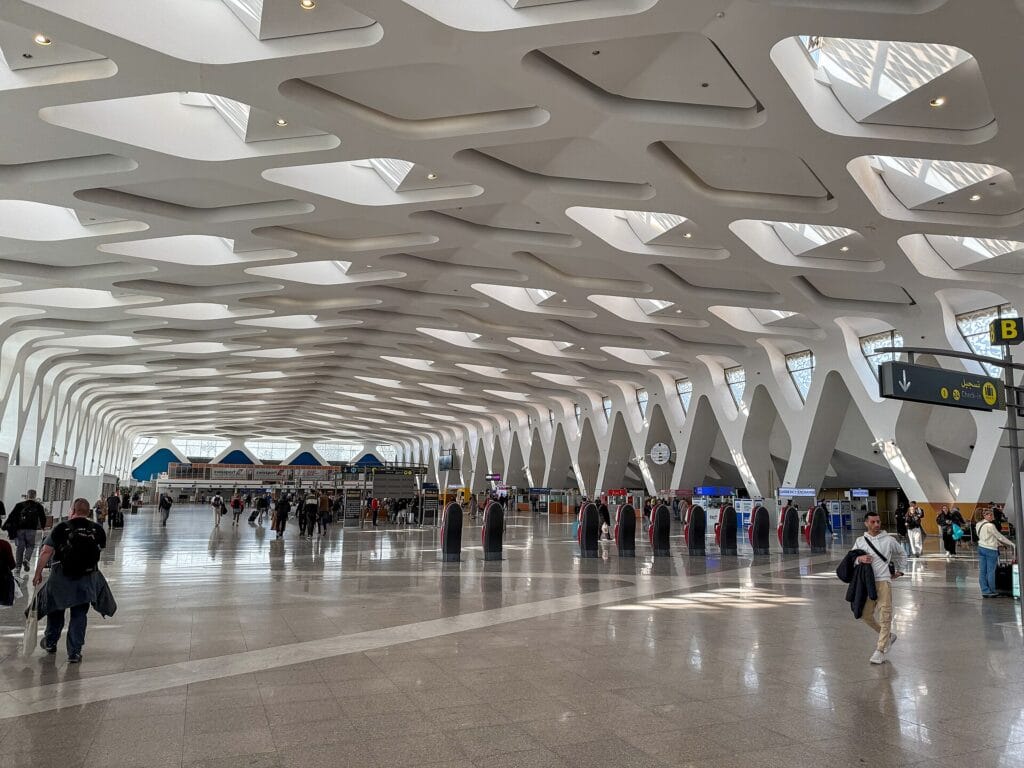
Mohammed V Airport is built around two adjacent, connected terminals: Terminal 1 (T1) and Terminal 2 (T2). The WiFi network covers both, but as in any large airport, the perceived quality varies depending on where you are and how busy it is at the time.
- Public halls and check-in areas: the signal is generally present, but these are also high-density traveller zones. If reception is poor, move away from the busiest queues.
- Boarding gates (after security): often the best compromise. You spend the most time here and passengers are more spread out. Settle in near a power outlet and an information point.
- Cafés and restaurants: the airport WiFi works here; it’s a good fallback, all the more so as you’ll find somewhere to sit and charge your phone.
- Technical areas or transit corridors: the signal can be weaker here. Don’t linger if you’re after a stable connection.
Simple tip: if your device shows a full signal but nothing loads, it’s not the range that’s the issue but network congestion. Get closer to an access point, or wait a few minutes for the wave of passengers to clear. To connect at CMN airport comfortably, the best move is still to do it once you’re settled at the boarding gate, rather than in the middle of the arrivals crush.
What to do if the WiFi is slow, congested or cut off?
A free public network is never perfect. If your connection is struggling, try these fixes in order before giving up:
- Reconnect. The most common cause of a drop is simply the end of the 30 minute session. Reopen the portal and start a new session.
- Forget then rejoin the network. In your WiFi settings, choose “forget this network”, then reconnect. This forces the captive portal to reload.
- Turn WiFi off and on again or switch briefly to airplane mode to reset the connection.
- Change position. Move away from crowds, get closer to a boarding gate or a café.
- Trigger the portal manually: type an address in
http://(not https) to force the redirect to the login page, which is sometimes blocked over https. - Switch to your mobile data. If you already have a local SIM or a roaming plan, now is the time: the 4G/5G of Moroccan operators is generally excellent around the airport.
If, despite everything, the Mohammed V airport WiFi isn’t enough for your needs (remote work, a long layover, professional video calls), don’t push it: a local SIM card or an eSIM will give you a much steadier connection. That is precisely the subject of the next section.
The alternatives: local SIM at the airport, eSIM and roaming
Free WiFi is handy in a pinch, but to be self-sufficient throughout your stay in Morocco, nothing beats your own mobile data. You have three options.
1. The local SIM card, bought directly at the airport
This is the most economical and the simplest option on arrival. Morocco has three operators: Maroc Telecom (IAM), Orange Maroc and Inwi. In the arrivals hall of Mohammed V Airport, after collecting your luggage and clearing customs, you’ll generally find their official kiosks. The staff are used to helping travellers: they set up the card, activate it and apply the data top-up you want in a matter of minutes.
What you need to know:
- Passport required. Identifying every number is a regulatory requirement in Morocco; without a passport, no activation.
- Unlocked phone. Before you travel, check that your device accepts SIMs from other operators.
- Indicative price. The SIM card itself is often free; you pay for the data top-up. Rates follow the national pricing, often on the order of €1 to €2 per GB (roughly 10 to 20 MAD), with tourist bundles combining data, calls and sometimes international minutes.
- Which operator to choose? For a city stay (Casablanca, Marrakech, Agadir), Orange and Inwi are often competitive thanks to their promotions. For more remote areas (the Atlas, the desert), Maroc Telecom remains a safe bet for coverage.
2. The eSIM: connected the moment you land
An eSIM (“virtual” SIM) is a digital profile you activate directly in the settings of a recent compatible phone, with no physical card. The advantage: you can set up your plan before the trip and be connected the moment you land, without queuing at a kiosk. First check that your smartphone supports eSIM (most recent models do, but not all). An eSIM may cost a little more per GB than a classic local SIM, but it saves you time and keeps your usual number active in parallel. As an independent guide, we don’t recommend any particular commercial provider: compare the offers yourself and favour those with good coverage in Morocco.
3. Roaming with your home operator
This is the “zero effort” option: you keep your SIM card and your usual plan, which connects automatically to a Moroccan network. Beware, though: outside a fee-free zone, roaming can be expensive in Morocco. Before you leave, contact your operator to find out its overseas rates and, if relevant, take out a “travel pass” to cap the bill. For a short stop or a layover, roaming switched on for a few hours may be enough; for a stay of several days, the local SIM or the eSIM are almost always more advantageous. Questions of telecom pricing and regulation in Morocco fall under the National Telecommunications Regulatory Agency (ANRT).
Comparison: free WiFi vs local SIM vs eSIM vs roaming
To choose at a glance, here is a summary table of the four ways to stay connected at Casablanca airport and beyond. Prices are indicative and may change.
| Solution | Indicative price | Pros | Cons | Best for |
|---|---|---|---|---|
| Free ONDA WiFi | Free | No cost, no hardware, covers the whole airport | 30 min sessions to renew, variable speed, public network | Short layover, checking emails and boarding pass |
| Local SIM (IAM / Orange / Inwi) | ≈ €1 to €2 per GB (10-20 MAD) | Most economical, stable 4G/5G, bought on the spot | Passport required, phone to unlock, short queue | A stay of several days in Morocco |
| eSIM | Variable (often a little more per GB) | Connected the moment you land, no physical card, keep your home number | Compatible phone required, price per GB sometimes higher | Travellers in a hurry with a recent smartphone |
| Roaming | Depends on operator (can be high) | Nothing to set up, keep your number | Potentially high cost without a travel pass | A very short stop or minimal use |
WiFi and security: VPN and good habits on a public network
A public WiFi network, however convenient, remains a network shared by hundreds of strangers. That doesn’t mean you should avoid it, but a few common-sense precautions are in order to protect your data while you use the Casablanca airport internet:
- Use a VPN. A virtual private network encrypts your traffic and protects you from interception on an open WiFi. Install and test your VPN app before you leave, because you’ll sometimes need to connect to the portal first, then turn on the VPN.
- Avoid sensitive banking operations. If possible, postpone transfers, account management or large payments until you’re on a trusted network (your mobile data, for example).
- Check for the HTTPS padlock. Only enter credentials on sites in
https://that display the security padlock. - Watch out for fake networks. A hacker can set up an access point with a misleading name. If you’re unsure of the exact name of the official network, check with the airport information desk.
- Disable file sharing and open AirDrop/Bluetooth while you’re connected to the public network.
- Enable two-factor authentication (2FA) on your important accounts: even if a password leaks, access stays protected.
In short: the airport WiFi is perfect for browsing, checking your bookings and staying reachable. Just save the most sensitive operations for a more controlled connection.
The lounges: more comfortable WiFi
If you’re travelling in business class, hold an eligible loyalty card, or simply want more comfort, the lounges at Mohammed V Airport make an excellent base for working or waiting. You’ll generally find a quieter environment, comfortable seating, plenty of power outlets and, often, a smoother internet connection than in the crowded public areas — not to mention food and drinks included depending on the lounge.
Lounge access comes through several channels: a premium-class ticket, frequent-flyer status (notably via the loyalty programme of Royal Air Maroc, the national carrier for which Mohammed V is the hub), premium bank cards offering access, or a pay-per-visit entry when it’s available. For a long layover, the maths is often quick: the entry price can be justified by the comfort, the peace and quiet, and a steadier connection for working. Ask about the conditions and rates directly at the entrance of the lounge concerned, as the offer changes.
Staying connected on the way into the city: ONCF train and taxi
Once your flight has landed and your connection is sorted, all that’s left is to reach Casablanca, located about 30 km north-west of the airport. The good news: travelling by train lets you stay connected via your mobile data as you go, with no traffic stress.
The ONCF train, straight from the airport
Mohammed V Airport has its own railway station, run by the National Railways Office (ONCF). The station is on the lower level, in the arrivals area: follow the “Train / ONCF” signage once you’ve collected your luggage. The trains link the airport to Casa-Voyageurs station in about thirty minutes, with a departure roughly every hour over a wide daily window (broadly from early morning until late evening; check the exact times for the day). Prices are indicative.
From Casa-Voyageurs, you’re connected to the rest of the ONCF network: connections to Casa-Port, Rabat, or on to Marrakech and Tangier (via the Al Boraq high-speed line from Casa-Voyageurs). Indicative price for airport → Casa-Voyageurs: on the order of 50 MAD (about €4.70) in 2nd class and 70 MAD (about €6.60) in 1st class. The train is often the most economical and most predictable way to reach the centre, since it avoids traffic jams. Remember to buy your ticket at the counter or the station machines, or online for long-distance journeys that require a reservation.
The taxi
The taxi remains practical, especially with bulky luggage, in a group, or when you arrive outside train hours. Expect a fare significantly higher than the train to reach central Casablanca. Agree on the price (or insist on the meter) before getting in, and keep in mind that night rates are higher. Having your mobile connection active helps here: it lets you check an address, a distance or book a ride through an app. To compare all your transfer options calmly, see our comparison of transfers from Morocco’s airports.
Practical tips to stay connected and charged
A good connection is useless if your battery is flat. Here are our recommendations for a smooth passage through CMN airport:
- Bring a power bank. It’s the best way never to depend on a free outlet. Keep it in your cabin bag, never in the hold.
- Pack an adapter. Morocco uses type C and E plugs (European standard, 220 V). If you’re coming from another region, a universal adapter is essential.
- Settle in near the outlets. The boarding gates and cafés have them; spot them as soon as you reach the waiting area.
- Download your essential apps before you leave: your airline’s app (offline boarding pass), an offline map of Casablanca, the ONCF app for trains, a messaging app, your VPN and possibly a translation app.
- Save your documents offline: tickets, hotel bookings, addresses. If the connection is temperamental, you won’t be stuck.
- Activate your eSIM or prepare your SIM before you leave the arrivals area, so you exit the airport already connected.
Casablanca airport in brief: CMN, terminals and hub
Mohammed V International Airport (IATA code CMN, ICAO code GMMN) is Morocco’s main airport and one of the busiest in Africa. Located about thirty kilometres south-east of Casablanca, in the municipality of Nouaceur, it is the Kingdom’s major air gateway and the hub of Royal Air Maroc, the national carrier. It is named after King Mohammed V.
The airport is built around two connected terminals, T1 and T2, handling domestic and international flights to Europe, Africa, the Middle East and North America. You’ll find the services expected of a major hub: currency exchange, ATMs, dining, shops, telecom operator counters, car-rental agencies, lounges and, of course, the integrated ONCF station. To dig deeper into the airport’s history and figures, the entry for Mohammed V International Airport on Wikipedia is a good reference point.
Planning a flight to another Moroccan city? Casablanca airport WiFi works on the same principle as at the country’s other airports. Find our sister guides for staying connected everywhere: the ultimate guide to WiFi at Marrakech airport, as well as our pages dedicated to WiFi at Agadir airport, WiFi at Fès airport, WiFi at Tangier airport and WiFi at Rabat airport.
Frequently asked questions
Is the WiFi really free at Casablanca airport?
Yes. Since 2015, ONDA has provided free WiFi throughout Mohammed V Airport, with no charge and no password. You connect via a portal by accepting the terms of use and entering your email address. Each session lasts about 30 minutes and is renewed simply by opening a new session.
How do I connect to the Mohammed V airport WiFi?
Turn on your device’s WiFi, select the airport network, let the captive portal open (or type an address in your browser to trigger it), accept the terms, enter your email and confirm. The connection is established automatically. No software or password is needed.
Is free WiFi or a local SIM card better?
For a short layover or a simple need to check your emails, free WiFi is enough. For any stay of several days in Morocco, a local SIM card (Maroc Telecom, Orange or Inwi) is more advantageous: it offers a stable 4G/5G connection everywhere, for a cost often on the order of €1 to €2 per GB. You buy it in the arrivals hall with your passport.
Do I need my passport to buy a SIM at the airport?
Yes, it’s mandatory. Moroccan regulations require every phone number to be identified: no operator can activate your SIM card without you presenting an ID document, in practice your passport for a foreign visitor.
Is the airport WiFi safe for payments or banking?
Like any public network, it doesn’t offer the same privacy as a private one. It’s perfectly suited to browsing, checking your bookings and staying reachable. For sensitive banking operations, however, it’s better to use a VPN, check for the HTTPS padlock, enable two-factor authentication, or postpone those actions to your own mobile data.
How do I get to central Casablanca from the airport?
The simplest and most economical option is the ONCF train, which departs from the station integrated into the airport and reaches Casa-Voyageurs in about thirty minutes (indicative price: around 50 MAD / €4.70 in 2nd class). From Casa-Voyageurs, you have connections to Casa-Port, Rabat, Marrakech or Tangier. The taxi is a faster door-to-door alternative but more expensive: agree on the price before getting in.
Image under a free licence via Wikimedia Commons: © Sharon Hahn Darlin (CC BY 2.0). Source: Wikimedia Commons. Image credits: royalty-free illustrative photo. moroccoairport.com is an independent guide, not affiliated with ONDA, Royal Air Maroc or the telecom operators mentioned. Information verified as of the publication date; prices and schedules are indicative and subject to change: always check the official sources before your trip.